Software for lawn care pros
Win the work. Run the route. Get paid.
Schedule crews, send quotes, collect payments, and keep field teams moving — even offline. SureGrounds flags weather-sensitive work before the truck rolls and handles the customer update when you reschedule.
Free for 14 days with All Access — every available feature included. No credit card required.

Watch the 38-sec overview
Features
Everything it takes to run the day
One system from the first quote to getting paid — and back out for the next visit. Start with the essentials, then turn on automation as it earns your trust.
Smart scheduling & routing
Book jobs by day or exact window, then auto-sequence each tech's stops for a shorter drive — one tap and the day is in order.
Quotes → jobs → invoices
Send a branded quote, win the work with one tap — completing priced work creates a draft invoice automatically.
Get paid without chasing
Let customers opt into autopay — when you send an invoice, their saved card is charged automatically. Otherwise, send a secure pay link, with two scheduled reminders available for overdue balances. Money lands straight in your own account.
Weather & soil intelligence
We watch the forecast and soil conditions and flag jobs to delay before you waste a truck roll. Rescheduling is one click — and the customer is told automatically by email, or text when you've switched it on.
Automatic customer comms
Booking confirmations, day-before reminders, and “tech on the way” notifications go out on their own — email out of the box, text when you switch it on. Fewer no-shows, fewer phone calls.
A mobile app for your crew
Routes, photos, customer notes, and one-tap check-in/complete — and it keeps working offline in the field, syncing when signal returns.
Office app
Run the whole operation from one screen
See every job and crew, send quotes customers can accept in one tap, surface the schedule exceptions that need attention, and follow each invoice through payment.
The day, before it starts
Fifteen jobs, three crews, weather, capacity, and money owed — one screen before the trucks roll.
Mobile app
A mobile app built for the truck
Crews get their route, access notes, photos, and field actions even when signal drops. Admins get a live Dispatch workspace for the changes that cannot wait until they are back at a desk.
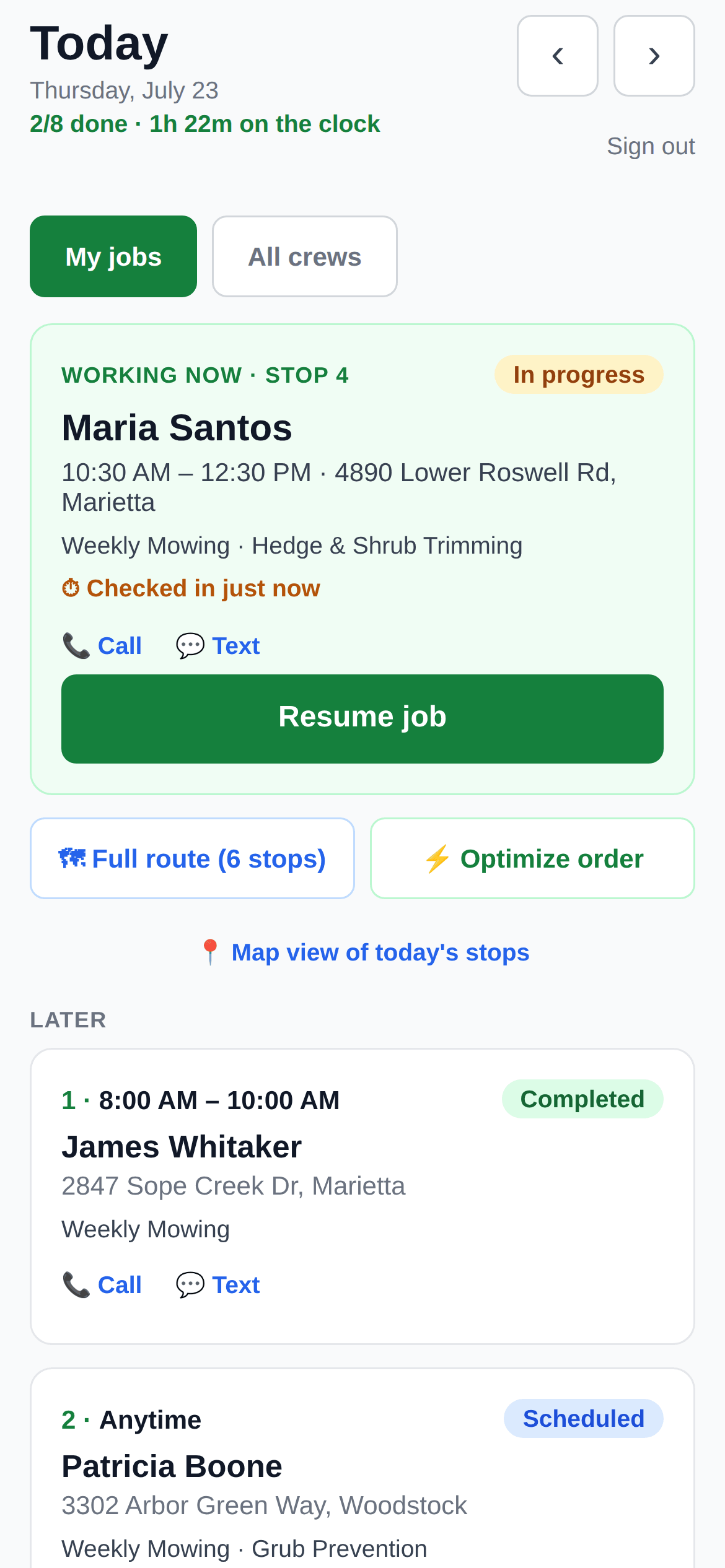


The day, in route order
The active stop stays prominent while the rest of the route remains one thumb away.
Customer website
Your own website, included
Every page below is built and published from SureGrounds — a hosted site you never have to maintain. Services and prices stay synced with your catalog, quote requests land in your inbox, and All Access lets you connect your own web address.
Your storefront, included
A polished home page with your service area, promotion, and quote call-to-action — hosted for you.
Prices straight from your catalog
The site renders live from your data — archive a service in the app and the page updates itself.
Proof and referrals built in
Curated reviews, your company story, and a refer-a-neighbor offer turn happy customers into the next job.
Weather-aware operations
A schedule should account for conditions, not just the clock.
Spraying before rain, mowing wet turf, and treating cold soil can waste a visit. SureGrounds models the forecast and soil temperature for each job, then flags work worth reviewing before the truck leaves.
Your crew sees a go / monitor / delay call on each stop. Your customers get an automatic heads-up. You stop burning fuel on visits that shouldn't happen.
How it works
Up and running in an afternoon
No long onboarding. Bring your customers, start scheduling, get paid.
Set up your services & customers
Pick your services from the pre-built library (or add your own), add your crew, then import customers from a spreadsheet — or let new ones come in through your built-in booking site.
Schedule and dispatch
Drop jobs on the calendar; we sequence each tech's day and send them the route. The office sees every crew at a glance.
Get paid and grow
Invoice on completion, collect online, and — when you switch review requests on — ask customers for a Google review while the work is fresh.
And everything else you'd expect
Pricing
Simple, honest pricing
One plan. Every available SureGrounds feature. Start with a 14-day free trial, no credit card required.
Founding price
SureGrounds All Access
One simple monthly price for the business. No feature maze.
$49/month
Free for 14 days. No credit card required. Cancel anytime; access continues through your paid month.
Customer payments go directly to your Stripe account. Standard Stripe processing fees apply.
FAQ
Fair questions, straight answers
How does the free trial work?
Every account starts with 14 days of All Access — no credit card up front. Add a payment method whenever you're ready; your first charge stays at the end of the original trial. If you don't subscribe, operations pause and nothing is deleted.
Can I use a domain I already own?
Yes. All Access includes a guided connection for your existing domain — you type it in, we detect your DNS provider, and you copy in one or two records. You keep ownership, we host and secure the site, and connecting it never touches your business email records. You'll never be asked for your domain password.
Am I locked into a contract?
No. All Access is month-to-month and you can cancel anytime; access continues through the month you've paid for. Your data isn't held hostage either — if you come back later, your account picks up where it left off at the price then offered.
Do you hold my money?
Never. Payments run through your own Stripe account: customers pay from a secure link — no login, no app — and the money settles directly to your bank. Payouts, refunds, and disputes are all yours.
Can I bring my existing customer list?
Yes — import customers from a spreadsheet in a few clicks, or add them one at a time. New customers can also book through your branded mini-site and land in your requests inbox.
I don't want software making decisions for me. Do I have to use the automation?
No. Every automation is a switch, not a requirement. Route optimization is a button, reminders and review requests are toggles, and the weather layer only advises — nothing on your calendar moves unless you move it.
Does the crew app work without cell coverage?
Yes. The app runs on iPhone and Android and keeps working offline — photos and job updates queue on the phone and sync automatically when signal returns.
How do my customers get notified?
Booking confirmations, day-before reminders, and “tech on the way” messages go out automatically — email out of the box, text messages when you turn them on. Customers can opt out anytime.
What happens when it rains?
SureGrounds watches the forecast and soil conditions for every job and flags the ones worth delaying before the truck rolls. Rescheduling is one click, and the customer is told automatically by email — or text once you've switched texting on. No phone tag.
Ready to run a tighter operation?
Set up your account in minutes — no credit card, no sales call.
Start free trial